
·
The evolution of visual interface technology has introduced new display formats that merge physical environments with dynamic content. A transparent OLED display (also called a see-through OLED or clear OLED display) presents digital information while allowing visibility through the screen itself. This dual function redefines how digital interfaces function in spatially complex environments.
By eliminating the opaque background of conventional displays, transparent OLED panels support both real-time interaction and environmental integration.
What Is Transparent OLED Technology?
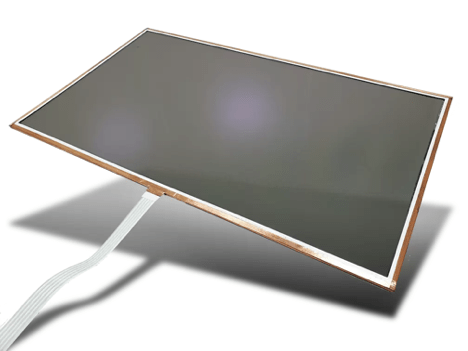
A transparent OLED display is a self-emissive screen built on a clear substrate with transparent electrodes, so viewers see objects behind the panel while images glow on its surface. Typical transparent OLED modules let roughly 35% to 45% of light pass through, need no backlight, and can be paired with touch for interactive see-through displays.
Transparent OLEDs differ from traditional display systems in their structural layout. In standard OLED configurations, the display stack sits on a reflective or opaque substrate. In a transparent OLED display, this structure is replaced with transparent materials that allow ambient light and background visibility to pass through.
Each pixel on the screen emits its own light and remains partially see-through when not active. No backlight is needed. This autonomy of light emission facilitates high contrast and clarity even in thin, frameless configurations. Transparency is achieved by using organic light-emitting compounds on a clear substrate combined with transparent electrodes.
This construction enables OLED technology to serve as both a functional interface and a window into the physical environment without requiring mechanical overlays or switching glass systems.
Transparent OLED vs Transparent LCD
- Light source: transparent OLED pixels emit their own light; a transparent LCD needs a bright backlight or light box behind the panel.
- Black levels: on a transparent OLED, black areas appear clear because those pixels are off; a transparent LCD can show darker, more opaque areas.
- Thickness: with no backlight, a transparent OLED panel can be much thinner and lighter.
- Best environment: transparent OLED screens suit indoor, controlled lighting; very bright ambient light reduces perceived contrast on any see-through display.
Key Features and Design Flexibility
The intrinsic flexibility of OLED display modules lies in their self-emissive construction and modular stack design. Transparency ranges typically between 35% and 45%, depending on pixel pitch, color depth, and circuit integration. The absence of backlighting makes thinner enclosures possible, which opens up opportunities for glass integration and frameless architectures.
Key features include:
- Wide viewing angles without distortion
- Lightweight structure with no backlight assembly
- Fast response times for real-time applications
- High contrast ratios, even in low-light conditions
- Variable transparency levels, controlled through driver logic
Designers can implement these displays in curved glass panels, frameless enclosures, or embedded modules without compromising visibility or control over brightness. Unlike projection-based transparent systems, OLED modules preserve image fidelity and motion clarity at varying viewing distances.
Transparent OLED Screen Applications in Gaming, Retail, and Control Rooms
The introduction of custom OLED displays into commercial and industrial settings introduces interface possibilities that extend beyond signage and static control.
In Gaming and Augmented Interfaces:
Transparent displays create layered interactions for simulation-based control systems or public-facing gaming experiences. Content appears to float above physical controllers or equipment, contributing to immersive setups.
In Retail Environments:
A transparent OLED display can be installed in shop windows, refrigerated display cases, or product showcases, allowing dynamic content to be overlaid on visible merchandise. Interactive pricing, branding, or motion graphics can be displayed directly onto glass-facing product lines without blocking physical visibility.
In Control and Command Rooms:
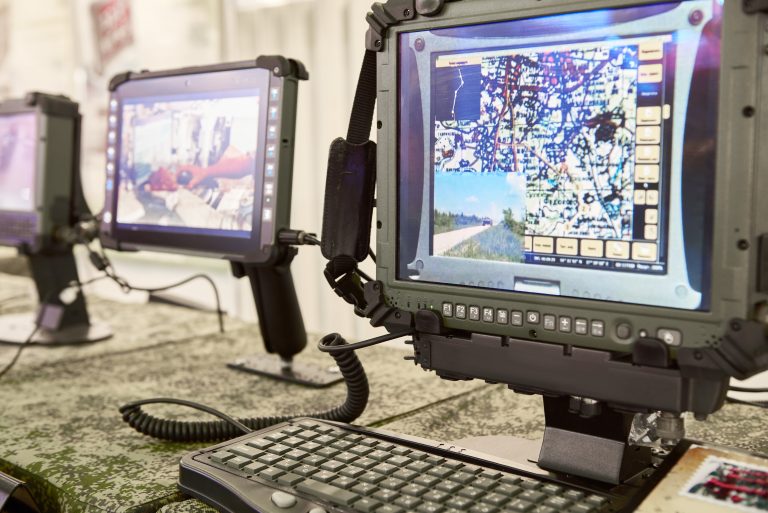
By using transparent interfaces, operators retain visual access to the space behind the display while monitoring real-time data. These applications include:
- Overlaying system metrics on large observation windows
- Integrating displays into glass partition walls
- Embedding touchscreen functionality into control booths
Transparent OLED Module Integration and Modularity
Transparent OLED modules are compatible with various integration pathways, depending on the system architecture and enclosure design.
These panels may be configured as:
- Standalone screens mounted in transparent enclosures
- Embedded panels in glass structures
- Multi-panel configurations for wide-format displays
Each OLED display module can be linked to system controllers via HDMI, LVDS, or embedded processors with driver IC compatibility. Input options include capacitive touch overlays or gesture-based sensors, depending on the application. Because PCAP touchscreens (projected capacitive touch) use transparent ITO electrodes, they add interactivity while keeping the panel see-through.
Thermal management and signal integrity must be considered during the integration process. The absence of a backlight reduces thermal load, but protective enclosures may require passive cooling or thermal isolation in outdoor or industrial settings.
How to Specify a Transparent OLED Module
Before requesting a quote, define these points so the display partner can recommend the right panel and stack:
- Screen size, resolution and aspect ratio
- Target transparency and what will sit behind the screen
- Ambient lighting and required brightness in nits
- Touch type, including glove use, and any cover glass or optical bonding needs
- Video interface (HDMI, LVDS or embedded controller) and mounting method
- Operating environment, duty cycle and how much static content will be shown, since OLED materials can age unevenly with fixed images
E3’s Transparent OLED Display Capabilities
E3 Displays engineers and produces custom OLED displays for commercial and industrial clients requiring non-standard formats or functionality.
Transparent OLED modules can be configured to meet specific integration demands, including:
- Touch interactivity with glove compatibility
- Variable transparency control for dynamic environments
- Ruggedized sealing for public-facing or field use
- Custom screen dimensions and thickness for embedded projects
Projects are supported from concept through delivery, including display stack design, bonding, controller integration, and environmental testing. OLED modules can be combined with anti-reflective coatings, EMI shielding, or customized UI layering, depending on the end-use conditions. Learn more about E3’s OLED displays, optical bonding, anti-reflective film lamination and EMI shielding services, or review E3’s case studies.
By working directly with OEMs and systems designers, E3 Displays configures display solutions that meet spatial and electrical requirements for transparent modules without compromising image fidelity or system interoperability.
Summary: Transparent OLED Integration with Purpose
Transparent OLED technology opens new directions for embedded interface design. By merging digital content with environmental transparency, displays can blend seamlessly into the surrounding space. This format is well-suited for industrial control rooms, public installations, retail enclosures, and simulation environments where spatial awareness and data display intersect.
Transparent OLED modules require a careful selection of materials, integration methods, and control electronics to perform effectively across lighting conditions and usage frequencies. Configurations depend on both electrical interface requirements and mounting constraints.
E3 Displays provides transparent OLED display modules and design support for commercial and industrial applications that require visibility, modularity, and custom integration. Contact E3 Displays to receive transparent OLED solutions tailored to your system environment.