
·
PCAP technology (projected capacitive technology) is a touch sensing method that uses a grid of transparent ITO electrodes behind a glass cover lens to detect the small change in capacitance caused by a finger. Unlike a resistive touch screen, a PCAP touch screen needs no pressure, supports multi-touch gestures, and can be tuned for gloves, water and electrical noise.
PCAP vs Resistive Touch Screen
When selecting touch screens for heavy-duty industrial applications, it can be difficult to find solutions that are compatible with gloves and harsh industrial environments. As you may know there are two different kinds of touch sensors, capacitive and resistive. For many years resistive touch technology has been the top choice for most touchscreen controls found on industrial machinery. Historically, one of the major advantages of a resistive touch screen was the ability to use anything on the screen, finger, stylus, and gloved finger because resistive touch screens are based on pressure, so anything can be used to close the gap and actuate the sensor. When first introduced to the market, Projected Capacitive (PCAP) improved optical clarity and was scratch resistant but did not perform well with gloved hands. However, new advancements in PCAP are changing that and making it a viable solution for industrial applications. This now gives product engineers two options to choose from either sticking with the historically more common application or moving forward with recent improvements in PCAP technology. Below, we explain how and why the new PCAP technology is replacing resistive as the go-to for industrial applications.
PCAP vs Resistive Touch Screen at a Glance
- Sensing method: PCAP detects a change in capacitance through a glass cover lens; resistive detects pressure that pushes two flexible layers together.
- Multi-touch: PCAP supports pinch, zoom and swipe gestures; resistive is typically single-touch.
- Gloves and stylus: resistive responds to any object; modern PCAP controllers can be tuned for many glove types, and a passive stylus needs a conductive tip.
- Optical clarity: a PCAP glass stack typically transmits more light and keeps contrast higher; resistive film layers can dull the image.
- Durability: the PCAP glass surface resists scratches; a resistive top film can wear or fail with heavy use.
- Water and noise: current PCAP firmware can reject water droplets and EMI noise; resistive ignores water but needs force to register a touch.
- Cost: resistive is usually the lower-cost option for simple, single-touch interfaces.
How Resistive Touch Technology Works
Resistive touch screens had been the focal point on the factory floor operations for decades. This technology features two transparent layers separated by a thin gap with spacers. When you tap the surface of a resistive touchscreen, the two layers press each other which triggers a voltage to pass through and identify exactly where you touched. This technology works thanks to pressure, and is known for its capability to identify a touch with a finger or an object. Furthermore, the surface of the touch sensor is invulnerable to foreign objects such as dust and water drops. Another major advantage resistive touch screens have had is its cost effectiveness but nevertheless, resistive touch includes several disadvantages as well.
Disadvantages of Resistive Touch Screens:
- Multi-touch is not supported (pinch, zoom, etc.)
- Not very sensitive; more pressure is needed to actuate the sensor (however, this can be an advantage for some applications)
- Lacks optical clarity
- Extra layers of material over the display dull the contrast
- More prone to scratches
- Heavy use can break down the sensor leaving it unresponsive. If the surface is damaged, the sensor will stop working
- Not available beyond 24” size due to economic scale
What Is Projected Capacitive (PCAP) Touch Technology?
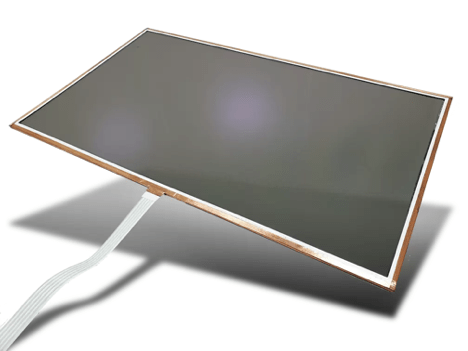
A projected capacitive touchscreen is a touch sensor built from rows and columns of transparent conductive electrodes, usually indium tin oxide (ITO), laminated behind a cover lens. A controller IC measures tiny changes in capacitance at each intersection, so a PCAP screen can locate several fingers at once without any pressure on the surface.
Capacitive sensing in touch screens has been around since the 1970s, but with the recent explosion in popularity of the smartphone, projected capacitive sensors (PCAP) have come to the forefront of touch screen technology. As a result of the success of advanced smartphones, users have discovered the many benefits of projected capacitive touch panels. Users are realizing the gesturing interface used on the advanced smartphone is a natural way of interacting with electronic devices. Now that projected capacitive touch panels are available in larger panel sizes, designers can bring this same experience to a variety of embedded systems where durability, reliability and overall performance of this technology can add value to more industries than just consumer products.
PCT (projected capacitive technology, another name for PCAP) technology is a capacitive technology which permits more accurate and flexible operation, projection of the touch field through additional layers of material plus full multi touch capability. Typical construction of a PCT technology sensor allows for operation without direct contact to the touch sensor. Thus the touch sensor can be located behind further insulating layers, and operate even under screen protectors, or behind weather and vandal-proof glass. Due to the top layer of a PCT being glass, PCT is a more robust solution versus resistive touch technology. Since PCT technology construction is an X and Y matrix of capacitors capable of locating multiple distinct touch points, PCAP sensors are true multi touch capable.
With the recent improvements of PCAP technology it quickly won over industrial application market shares from resistive touch. PCAP touch screens started to be introduced more in applications where customers require a more rugged surface due to susceptibility to scratches and mishandlings making it the new best solution for industrial applications. With the recent improvements of PCAP technology it quickly won over industrial application market shares from resistive touch. PCAP touch screens started to be introduced more in applications where customers require a more rugged surface due to susceptibility to scratches and mishandlings making it the new best solution for industrial applications. E3 Displays designs custom PCAP touchscreens that can be combined with optical bonding, anti-reflective film lamination and EMI shielding for rugged industrial displays.  Advantages of PCAP Touch Screens:
- More scratch/abrasion resistance due to a glass or acrylic lens
- Highly responsive, touch sensitive: the actuation of a capacitive sensor is light touch and smooth when it comes to drag and swipes
- Multi-touch is supported
- Sensor can often continue to work even if the top lens is cracked/broken. PCAP is great for heavy use applications
- High contrast, great visual appearance
- Can be optically bonded to the LCD to reduce internal reflections and improve sunlight readability
Why PCAP Technology Wins for Industrial Applications
Capacitive touch screens were actually invented almost 10 years before the first resistive touchscreen. In the beginning PCAP were typically used more for consumer products like laptops, smartphones and tablets. Here we discuss some features that allow the new technology to overcome the past and now be the lead touchscreen for industrial applications. If you are evaluating touch technologies for rugged displays or industrial control panels, compare candidates on these five factors.
Touch Controller
There are two options for incorporating touch controllers in the PCAP touch devices. In the first one, an Integrated Circuit (IC) controller is mounted on the surface on a separate PC board, known as Chip on Board (COB), which allows signals to be transmitted from the touch sensor through the flexible printed circuit to the PCB. Then, the IC firmware will transform the capacitance data into a digital touch position data which will be sent to the host computer. The second option is to mount the controller IC chip on the surface directly on the touch flex tail, also known as Chip on Flex (COF). In this case, an analog capacitance signal is converted into digital position data on the FPC which will be sent to the computer via serial interface. Common host interfaces for PCAP controllers include USB and I2C. 
Noise Immunity
Electromagnetic interference (EMI) noise can interfere with the accurate detection of touch events in PCAP touch screens. To maintain the accuracy of the touch detection, the PCAP touch controller leverages firmware and hardware to avoid noise interference at different frequency bandwidths. At the display level, EMI shielding and proper grounding of the touch sensor further improve noise immunity near motors, drives and radios. 
Water Handling
On certain industrial applications, water can accumulate on top of PCAP touch screens and trigger false touches. To avoid those false touches, the latest PCAP technology features water repellent surface treatments and a firmware algorithm to differentiate an actual touch from water droplets. These new features enable the touch screens to work reliably with challenging operating conditions. 
Gloved Touch
The improved algorithm on PCAP touch controller firmware enables the touchscreen manufacturer to be able to tune the projection field for different applications, thus enabling workers to keep their thick working or safety gloves on while operating on their HMI equipment. Glove performance depends on glove material and thickness, so a PCAP touchscreen should be tested with the actual gloves used in the field. 
Thick Cover Lens
To improve precision, certain PCAP touch screens now include a thicker glass which will detect fewer signals while increasing the signal strength and maintain an optimal noise ratio. A thicker cover lens also improves impact resistance, and the touch controller must be tuned to match the lens thickness. 
Where would a Resistive Touch Screen still be used?
When it comes to a resistive touch screen, you need to push a little harder for your touch to get detected and they cannot recognize multiple touches at the same time. Nevertheless, these applications still find a lot of value and are widely used in many markets. These touch screens are durable and affordable, so they are widely used in credit card readers, many defense applications, points of sale, medical equipment, and consumer markets. In these instances, the resistive touch screens deliver the exact features needed for the display. Here is a list of advantages that still make resistive touch screens a great solution for these categories and more.  Advantages of Resistive Touch Screens:
- Less complex to make which results in a lower product cost
- Can be used with bare finger, gloved finger, stylus, etc
- Does not respond to contact from outside stimuli (ex: dust and water splashes)
As a rule of thumb, choose a PCAP touch screen when you need multi-touch, high optical clarity, a durable glass surface or a sealed front for washdown. Choose resistive when cost is the main driver, the interface is single-touch, and users must operate it with any stylus or object.
Conclusion:
Both capacitive and resistive touch screens can offer a durable, high-quality, crystal-clear image solution. However, there are a few key advantages of choosing a capacitive touchscreen over a resistive touchscreen for industrial applications. The recent improvements of PCAP touchscreen technology have increased performance with breakthroughs in IC controllers, driver and firmware, which increase precision, and reduce EMI noise. As a result, you can leverage PCAP touch technology for better durability, improved scratch resistance, and greater touch precision for your industrial applications. To discuss a custom PCAP touch screen for your product, contact E3’s engineering team in Phoenix, AZ, or explore E3’s PCAP touchscreens and touch panels.
About E3 Displays:
High performance and dependability is needed from industrial displays. E3 provides solutions that give you peace of mind during the busiest work environments. With over 20 years of combined experience in display technology, E3 Displays has everything you need to develop and manufacture your custom touch display all in one place. With customer-centric solutions featuring strategic planning, competitive pricing, longevity and support, we ensure the best products on the market to help you scale. Both capacitive and resistive touch screens can offer a high-quality, crystal-clear image. However, there are a few key advantages of choosing a capacitive touchscreen over a resistive touchscreen. As explained here, advancements in PCAP Technology are replacing Resistive as the go-to for Industrial Applications.